5 · 原书 174–207 页软件定时器管理
5.1本章引言与范围
软件定时器用于调度某个函数在未来设定时刻执行,或以固定频率周期性执行。被软件定时器执行的函数称为软件定时器的回调函数。
软件定时器由 FreeRTOS 内核实现并受其控制,不依赖硬件支持,与硬件定时器或硬件计数器无关。
遵循 FreeRTOS 以精巧设计追求最大效率的理念:除非软件定时器回调函数真正在执行,否则软件定时器不占用任何处理时间。
软件定时器功能是可选的。要启用软件定时器功能:
- 把 FreeRTOS 源文件
FreeRTOS/Source/timers.c纳入工程编译; - 在
FreeRTOSConfig.h中把configUSE_TIMERS设为 1。
本章帮助读者理解:软件定时器与任务特性上的区别;RTOS 守护任务;定时器命令队列;单次定时器与周期定时器的区别;如何创建、启动、复位软件定时器以及修改其周期。
5.2软件定时器回调函数
软件定时器回调函数以 C 函数形式实现,唯一特殊之处是其原型:返回值为 void,唯一参数是指向软件定时器的句柄。原型见清单 72。
void ATimerCallback( TimerHandle_t xTimer );
回调函数从头执行到尾、正常退出,应当保持简短,绝不能进入阻塞态。
xQueueReceive() 一类函数,但前提是其 xTicksToWait 参数(阻塞时间)必须设为 0;不能调用 vTaskDelay() 一类函数,因为它总会把调用任务放入阻塞态。5.3软件定时器的属性与状态
5.3.1软件定时器的周期
软件定时器的“周期”是从定时器被启动,到其回调函数执行之间的时间。
5.3.2单次定时器与自动重装定时器
软件定时器分两类:
- 单次定时器(One-shot):一旦启动,只执行一次回调函数。单次定时器可手动重启,但不会自行重启。
- 自动重装定时器(Auto-reload):一旦启动,每次到期后自行重启,从而周期性地执行回调函数。
5.3.3软件定时器状态
软件定时器处于以下两种状态之一:
- 休眠态(Dormant):定时器存在、可经句柄引用,但未运行,其回调函数不会执行。
- 运行态(Running):自定时器进入运行态、或自上次复位起经过一个周期时间后,执行其回调函数。
xTimerDelete() API 可删除定时器,定时器可在任意时刻被删除。- 休眠态 → 运行态:调用
xTimerStart()、xTimerReset()或xTimerChangePeriod(); - 运行态 → 休眠态:调用
xTimerStop(); - 运行态到期:执行回调函数;自动重装定时器回到运行态,单次定时器回到休眠态;
xTimerCreate()调用后定时器处于休眠态。
5.4软件定时器的运行上下文
5.4.1RTOS 守护(定时器服务)任务
所有软件定时器回调函数都在同一个 RTOS 守护任务(或称“定时器服务任务”)上下文中执行。守护任务是标准 FreeRTOS 任务,在调度器启动时自动创建;其优先级与栈深度分别由 FreeRTOSConfig.h 中的编译期配置常量 configTIMER_TASK_PRIORITY 与 configTIMER_TASK_STACK_DEPTH 设定。
回调函数绝不能调用会使调用任务进入阻塞态的 FreeRTOS API,否则会导致守护任务进入阻塞态。
5.4.2定时器命令队列
软件定时器 API 函数通过一个名为“定时器命令队列”的队列,把命令从调用任务发送给守护任务,如图 41 所示。命令包括“启动定时器”“停止定时器”“复位定时器”等。
定时器命令队列是标准 FreeRTOS 队列,在调度器启动时自动创建;其长度由 FreeRTOSConfig.h 中 configTIMER_QUEUE_LENGTH 配置常量设定。
xTimerReset(),其实现向定时器命令队列写入命令;守护任务(伪表示)循环中 xQueueReceive() 等待命令并处理。API 函数写队列,守护任务从队列读。5.4.3守护任务调度
守护任务与其他 FreeRTOS 任务一样被调度;只有当它是能够运行的最高优先级任务时,才会处理命令或执行定时器回调。configTIMER_TASK_PRIORITY 的取值影响执行模式,分别见图 42、图 43。
xTimerStart() 的任务优先级高于守护任务时的执行模式,优先级:Task1 > 守护任务 > 空闲任务):① t1,Task1 运行,守护任务阻塞;② t2,Task1 调用 xTimerStart(),向命令队列发命令使守护任务退出阻塞;因 Task1 优先级更高,守护任务不抢占它,进入就绪态;③ t3,Task1 完整执行完 xTimerStart(),期间未离开运行态;④ t4,Task1 调用某 API 进入阻塞态,守护任务成为就绪态最高优先级任务,被调度运行并处理 Task1 发来的命令;⑤ t5,守护任务处理完命令后再从命令队列取数据,队列为空,重新进入阻塞态,空闲任务被调度运行。注意:被启动定时器的到期时刻,按“启动命令送入命令队列”的时刻计算,而不是按守护任务收到命令的时刻计算。xTimerStart() 的任务时的执行模式,优先级:守护任务 > Task1 > 空闲任务):① t1,Task1 运行、守护任务阻塞;② t2,Task1 调用 xTimerStart() 向命令队列发命令,守护任务退出阻塞;因守护任务优先级更高,调度器选中它进入运行态,Task1 被抢占进入就绪态;③ t3,守护任务处理完命令后队列空,重新阻塞,Task1 成为就绪最高优先级任务;④ t4,Task1 重新进入运行态后才从 xTimerStart() 返回;⑤ t5,Task1 调用 API 进入阻塞态,空闲任务运行。图 42 场景中,Task1 发出命令到守护任务接收处理之间存在时间间隔;图 43 场景中,守护任务在 Task1 从发命令函数返回前就已接收并处理了命令。
送入定时器命令队列的命令带有时间戳,用于补偿“应用任务发出命令”与“守护任务处理同一命令”之间经过的时间。例如要启动周期 10 个节拍的定时器,时间戳保证定时器在命令发出后 10 个节拍到期,而不是守护任务处理命令后 10 个节拍到期。
5.5创建并启动软件定时器
5.5.1xTimerCreate() API 函数
FreeRTOS V9.0.0 还提供 xTimerCreateStatic(),在编译期静态分配创建定时器所需内存。软件定时器必须显式创建后才能使用。定时器由 TimerHandle_t 类型变量引用;xTimerCreate() 创建软件定时器,并返回引用所创建定时器的 TimerHandle_t。定时器创建后处于休眠态,可在调度器运行前创建,也可在调度器启动后由任务创建。
TimerHandle_t xTimerCreate( const char * const pcTimerName,
                            TickType_t xTimerPeriodInTicks,
                            UBaseType_t uxAutoReload,
                            void * pvTimerID,
TimerCallbackFunction_t pxCallbackFunction );| 参数名 / 返回值 | 说明 |
|---|---|
| pcTimerName | 定时器的描述性名称,FreeRTOS 本身不使用,仅作为调试辅助:用人可读名称标识定时器,比用句柄标识简单得多。 |
| xTimerPeriodInTicks | 以节拍为单位指定定时器周期;pdMS_TO_TICKS() 宏可把毫秒换算为节拍。 |
| uxAutoReload | 设为 pdTRUE 创建自动重装定时器;设为 pdFALSE 创建单次定时器。 |
| pvTimerID | 每个软件定时器都有一个 ID 值。ID 是 void 指针,应用设计者可作任意用途;当同一回调函数被多个定时器使用时尤为有用,可保存定时器专属数据。本章示例演示了 ID 的用法。pvTimerID 为被创建定时器的 ID 设置初值。 |
| pxCallbackFunction | 软件定时器回调函数就是符合清单 72 原型的 C 函数;本参数是用作新定时器回调的函数指针(实际即函数名)。 |
| 返回值 | 返回 NULL 表示堆内存不足,FreeRTOS 无法分配所需数据结构;返回非 NULL 表示创建成功,返回值即所创建定时器的句柄。堆内存管理详见第 2 章。 |
5.5.2xTimerStart() API 函数
xTimerStart() 用于启动处于休眠态的软件定时器,或复位(重启)处于运行态的软件定时器。xTimerStop() 用于停止运行态定时器;停止定时器等价于把它转入休眠态。
xTimerStart() 可在调度器启动前调用,但那样定时器实际要到调度器启动时才真正开始运行。
xTimerStart();应改用中断安全版本 xTimerStartFromISR()。BaseType_t xTimerStart( TimerHandle_t xTimer, TickType_t xTicksToWait );
| 参数名 / 返回值 | 说明 |
|---|---|
| xTimer | 被启动或复位的软件定时器句柄,来自创建定时器的 xTimerCreate()。 |
| xTicksToWait | xTimerStart() 通过定时器命令队列向守护任务发送“启动定时器”命令;xTicksToWait 指定队列已满时,调用任务在阻塞态等待队列出现空位的最长时间。为 0 且队列已满时立即返回。阻塞时间以节拍为单位,绝对时长取决于节拍频率;pdMS_TO_TICKS() 可换算毫秒。若 FreeRTOSConfig.h 中 INCLUDE_vTaskSuspend 为 1,设为 portMAX_DELAY 会使任务无限等待(不超时)。调度器启动前调用时,xTicksToWait 被忽略,行为等同于设为 0。 |
| 返回值 | ① pdPASS:仅在“启动定时器”命令成功送入命令队列时返回。若守护任务优先级高于调用 xTimerStart() 的任务,调度器保证启动命令在 xTimerStart() 返回前被处理——命令队列一有数据,守护任务就抢占调用任务。若指定了阻塞时间,调用任务可能曾阻塞等待空位,但在阻塞时间到期前数据已成功写入队列。② pdFALSE:命令未能写入队列(队列已满)。若指定了阻塞时间,则调用任务曾阻塞等待守护任务腾出空位,但在阻塞时间到期前空位仍未出现。 |
5.5.3示例 13:创建单次与自动重装定时器
本示例创建并启动一个单次定时器和一个自动重装定时器,见清单 75。
/* The periods assigned to the one-shot and auto-reload timers are 3.333 second and half a
   second respectively. */
#define mainONE_SHOT_TIMER_PERIOD        pdMS_TO_TICKS( 3333 )
#define mainAUTO_RELOAD_TIMER_PERIOD pdMS_TO_TICKS( 500 )

int main( void )
{
    TimerHandle_t xAutoReloadTimer, xOneShotTimer;
    BaseType_t xTimer1Started, xTimer2Started;

   /* Create the one shot timer, storing the handle to the created timer in xOneShotTimer. */
   xOneShotTimer = xTimerCreate(
                  /* Text name for the software timer - not used by FreeRTOS. */
                  "OneShot",
                  /* The software timer's period in ticks. */
                  mainONE_SHOT_TIMER_PERIOD,
                  /* Setting uxAutoRealod to pdFALSE creates a one-shot software timer. */
                  pdFALSE,
                  /* This example does not use the timer id. */
                  0,
                  /* The callback function to be used by the software timer being created. */
                  prvOneShotTimerCallback );

   /* Create the auto-reload timer, storing the handle to the created timer in xAutoReloadTimer. */
   xAutoReloadTimer = xTimerCreate(
                  /* Text name for the software timer - not used by FreeRTOS. */
                  "AutoReload",
                  /* The software timer's period in ticks. */
                  mainAUTO_RELOAD_TIMER_PERIOD,
                  /* Setting uxAutoRealod to pdTRUE creates an auto-reload timer. */
                  pdTRUE,
                  /* This example does not use the timer id. */
                  0,
                  /* The callback function to be used by the software timer being created. */
                  prvAutoReloadTimerCallback );

   /* Check the software timers were created. */
   if( ( xOneShotTimer != NULL ) && ( xAutoReloadTimer != NULL ) )
   {
       /* Start the software timers, using a block time of 0 (no block time).  The scheduler has
          not been started yet so any block time specified here would be ignored anyway. */
       xTimer1Started = xTimerStart( xOneShotTimer, 0 );
       xTimer2Started = xTimerStart( xAutoReloadTimer, 0 );

       /* The implementation of xTimerStart() uses the timer command queue, and xTimerStart()
          will fail if the timer command queue gets full.  The timer service task does not get
          created until the scheduler is started, so all commands sent to the command queue will
          stay in the queue until after the scheduler has been started.  Check both calls to
          xTimerStart() passed. */
       if( ( xTimer1Started == pdPASS ) && ( xTimer2Started == pdPASS ) )
       {
           /* Start the scheduler. */
           vTaskStartScheduler();
       }
   }

   /* As always, this line should not be reached. */
   for( ;; );
}两个定时器的回调函数每次被调用时只打印一条消息。单次定时器回调见清单 76,自动重装定时器回调见清单 77。
static void prvOneShotTimerCallback( TimerHandle_t xTimer )
{
    TickType_t xTimeNow;

    /* Obtain the current tick count. */
    xTimeNow = xTaskGetTickCount();

    /* Output a string to show the time at which the callback was executed. */
    vPrintStringAndNumber( "One-shot timer callback executing", xTimeNow );

    /* File scope variable. */
    ulCallCount++;
}static void prvAutoReloadTimerCallback( TimerHandle_t xTimer )
{
TickType_t xTimeNow;
/* Obtain the current tick count. */
xTimeNow = uxTaskGetTickCount();
/* Output a string to show the time at which the callback was executed. */
vPrintStringAndNumber( "Auto-reload timer callback executing", xTimeNow );
ulCallCount++;
}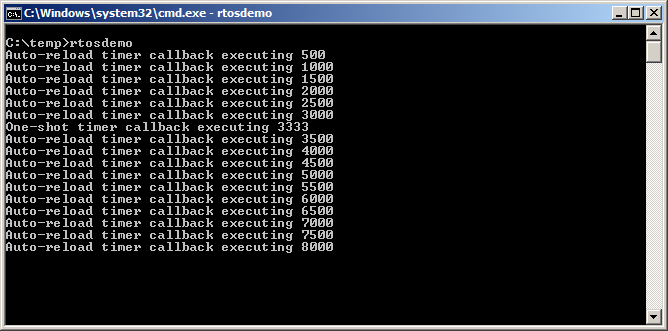
图 44 可见自动重装定时器回调以固定 500 节拍周期执行(mainAUTO_RELOAD_TIMER_PERIOD 设为 500);单次定时器回调只在节拍计数为 3333 时执行一次(mainONE_SHOT_TIMER_PERIOD 设为 3333)。
5.6定时器 ID
每个软件定时器都有一个 ID,是可供应用设计者作任意用途的标记值。ID 存于 void 指针中,可直接保存整数、指向其他对象,或作为函数指针使用。
创建定时器时为 ID 赋初值;之后可用 vTimerSetTimerID() 更新 ID,用 pvTimerGetTimerID() 查询 ID。与其他定时器 API 不同,这两个函数直接访问定时器本身,不向定时器命令队列发送命令。
5.6.1vTimerSetTimerID() API 函数
void vTimerSetTimerID( const TimerHandle_t xTimer, void *pvNewID );
| 参数名 | 说明 |
|---|---|
| xTimer | 被更新 ID 值的软件定时器句柄,来自 xTimerCreate()。 |
| pvNewID | 定时器 ID 要被设置成的值。 |
5.6.2pvTimerGetTimerID() API 函数
void *pvTimerGetTimerID( TimerHandle_t xTimer );
| 参数名 / 返回值 | 说明 |
|---|---|
| xTimer | 被查询的软件定时器句柄,来自 xTimerCreate()。 |
| 返回值 | 被查询软件定时器的 ID。 |
5.6.3示例 14:使用回调函数参数与软件定时器 ID
同一个回调函数可以赋给多个软件定时器;此时用回调函数参数判断是哪个定时器到期。示例 13 使用了两个独立回调;示例 14 实现类似功能,但把同一个回调函数赋给两个定时器。
示例 14 的 main() 与示例 13 几乎相同,唯一差别在创建定时器处:两个定时器都使用 prvTimerCallback() 作为回调,见清单 80。
/* Create the one shot timer software timer, storing the handle in xOneShotTimer. */
xOneShotTimer = xTimerCreate( "OneShot",
                              mainONE_SHOT_TIMER_PERIOD,
                              pdFALSE,
                              /* The timer’s ID is initialized to 0. */
                              0,
                              /* prvTimerCallback() is used by both timers. */
                              prvTimerCallback );

/* Create the auto-reload software timer, storing the handle in xAutoReloadTimer */
xAutoReloadTimer = xTimerCreate( "AutoReload",
                                  mainAUTO_RELOAD_TIMER_PERIOD,
                                  pdTRUE,
                                  /* The timer’s ID is initialized to 0. */
                                  0,
                                  /* prvTimerCallback() is used by both timers. */
prvTimerCallback );任一定时器到期都会执行 prvTimerCallback()。函数实现通过参数判断本次调用是因单次定时器到期还是自动重装定时器到期。示例还演示如何把定时器 ID 用作定时器专属存储:每个定时器在自己的 ID 中保存到期次数;自动重装定时器利用该计数在第 5 次执行时停止自己。实现见清单 81。
static void prvTimerCallback( TimerHandle_t xTimer )
{
    TickType_t xTimeNow;
    uint32_t ulExecutionCount;

    /* A count of the number of times this software timer has expired is stored in the timer's
       ID.  Obtain the ID, increment it, then save it as the new ID value.  The ID is a void
       pointer, so is cast to a uint32_t. */
    ulExecutionCount = ( uint32_t ) pvTimerGetTimerID( xTimer );
    ulExecutionCount++;
    vTimerSetTimerID( xTimer, ( void * ) ulExecutionCount );

    /* Obtain the current tick count. */
    xTimeNow = xTaskGetTickCount();

    /* The handle of the one-shot timer was stored in xOneShotTimer when the timer was created.
       Compare the handle passed into this function with xOneShotTimer to determine if it was the
       one-shot or auto-reload timer that expired, then output a string to show the time at which
       the callback was executed. */
    if( xTimer == xOneShotTimer )
    {
        vPrintStringAndNumber( "One-shot timer callback executing", xTimeNow );
    }
    else
    {
        /* xTimer did not equal xOneShotTimer, so it must have been the auto-reload timer that
           expired. */
        vPrintStringAndNumber( "Auto-reload timer callback executing", xTimeNow );

        if( ulExecutionCount == 5 )
        {
            /* Stop the auto-reload timer after it has executed 5 times.  This callback function
               executes in the context of the RTOS daemon task so must not call any functions that
               might place the daemon task into the Blocked state.  Therefore a block time of 0 is
               used. */
            xTimerStop( xTimer, 0 );
        }
    }
}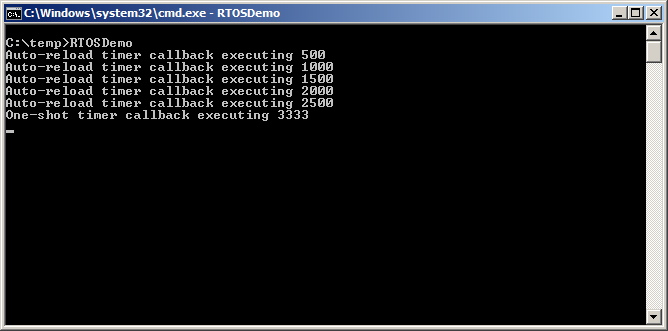
可见自动重装定时器只执行了五次。
5.7修改定时器周期
每个官方 FreeRTOS 移植都附带一个或多个示例工程。多数示例工程带自检功能,用 LED 直观反馈工程状态:自检一直通过则 LED 慢闪;曾有自检失败则 LED 快闪。
部分示例工程在任务中执行自检,用 vTaskDelay() 控制 LED 闪烁速率;另一些在软件定时器回调中执行自检,用定时器周期控制闪烁速率。
5.7.1xTimerChangePeriod() API 函数
用 xTimerChangePeriod() 修改软件定时器周期。若改的是已在运行的定时器,它将按新周期值重新计算到期时刻;重算的到期时刻以调用 xTimerChangePeriod() 的时刻为基准,而不是以定时器最初启动时刻为基准。若改的是休眠态(未运行)定时器周期,定时器会计算出到期时刻并转入运行态(开始运行)。
xTimerChangePeriod();应改用中断安全版本 xTimerChangePeriodFromISR()。BaseType_t xTimerChangePeriod( TimerHandle_t xTimer,
TickType_t xNewTimerPeriodInTicks,
TickType_t xTicksToWait );| 参数名 / 返回值 | 说明 |
|---|---|
| xTimer | 被更新为新周期值的软件定时器句柄。 |
| xNewTimerPeriodInTicks | 软件定时器的新周期,以节拍为单位;pdMS_TO_TICKS() 可换算毫秒。 |
| xTicksToWait | 函数通过命令队列向守护任务发送“修改周期”命令;xTicksToWait 指定队列已满时调用任务在阻塞态等待空位的最长时间。为 0 且队列已满时立即返回。INCLUDE_vTaskSuspend 为 1 时,portMAX_DELAY 表示无限等待。调度器启动前调用时该参数被忽略,等同于设为 0。 |
| 返回值 | ① pdPASS:仅在数据成功送入命令队列时返回;若指定阻塞时间,调用任务可能曾阻塞等待空位,但在到期前成功写入。② pdFALSE:命令未能写入队列(已满);若指定阻塞时间,则曾阻塞等待守护任务腾出空位,但到期前空位仍未出现。 |
清单 83 演示:在软件定时器回调中执行自检的 FreeRTOS 示例,如何在自检失败时用 xTimerChangePeriod() 提高 LED 闪烁频率。执行自检的定时器称为“检查定时器(check timer)”。
/* The check timer is created with a period of 3000 milliseconds, resulting in the LED toggling
   every 3 seconds.  If the self-checking functionality detects an unexpected state, then the check
   timer’s period is changed to just 200 milliseconds, resulting in a much faster toggle rate. */
const TickType_t xHealthyTimerPeriod = pdMS_TO_TICKS( 3000 );
const TickType_t xErrorTimerPeriod   = pdMS_TO_TICKS( 200 );

/* The callback function used by the check timer. */
static void prvCheckTimerCallbackFunction( TimerHandle_t xTimer )
{
    static BaseType_t xErrorDetected = pdFALSE;

    if( xErrorDetected == pdFALSE )
    {
        /* No errors have yet been detected.  Run the self-checking function again.  The
           function asks each task created by the example to report its own status, and also checks
           that all the tasks are actually still running (and so able to report their status
           correctly). */
        if( CheckTasksAreRunningWithoutError() == pdFAIL )
        {
            /* One or more tasks reported an unexpected status.  An error might have occurred.
               Reduce the check timer’s period to increase the rate at which this callback function
               executes, and in so doing also increase the rate at which the LED is toggled.  This
               callback function is executing in the context of the RTOS daemon task, so a block
               time of 0 is used to ensure the Daemon task never enters the Blocked state. */
            xTimerChangePeriod( xTimer,            /* The timer being updated. */
                                 xErrorTimerPeriod, /* The new period for the timer. */
                                 0 );               /* Do not block when sending this command. */
        }

        /* Latch that an error has already been detected. */
        xErrorDetected = pdTRUE;
    }

    /* Toggle the LED.  The rate at which the LED toggles will depend on how often this function
       is called, which is determined by the period of the check timer. The timer’s period will
       have been reduced from 3000ms to just 200ms if CheckTasksAreRunningWithoutError() has ever
       returned pdFAIL. */
    ToggleLED();
}5.8复位软件定时器
复位软件定时器即重启定时器:到期时刻重新计算为相对复位时刻,而非相对最初启动时刻。图 46 演示:一个周期为 6 的定时器被启动后复位两次,最终才到期并执行回调。
5.8.1xTimerReset() API 函数
用 xTimerReset() 复位定时器;它也可用来启动处于休眠态的定时器。
xTimerReset();应改用中断安全版本 xTimerResetFromISR()。BaseType_t xTimerReset( TimerHandle_t xTimer, TickType_t xTicksToWait );
| 参数名 / 返回值 | 说明 |
|---|---|
| xTimer | 被复位或启动的软件定时器句柄。 |
| xTicksToWait | 函数通过命令队列向守护任务发送“复位”命令;xTicksToWait 指定队列已满时调用任务在阻塞态等待空位的最长时间。为 0 且队列已满时立即返回。INCLUDE_vTaskSuspend 为 1 时,portMAX_DELAY 表示无限等待。 |
| 返回值 | ① pdPASS:数据成功送入命令队列;若指定阻塞时间,调用任务可能曾阻塞等待空位,但在到期前成功写入。② pdFALSE:命令未能写入队列(已满);若指定阻塞时间,则曾阻塞等待,但到期前空位仍未出现。 |
5.8.2示例 15:复位软件定时器
本示例模拟手机背光行为:按键时点亮背光;在一定时间内继续按键则保持点亮;超过一定时间无按键则自动熄灭。用单次软件定时器实现:
- 按键时点亮(模拟)背光,在定时器回调函数中熄灭背光;
- 每次按键都复位该软件定时器;
- 为防止背光熄灭而必须按键的时间间隔,等于定时器周期:若定时器到期前未被按键复位,回调执行,背光熄灭。
xSimulatedBacklightOn 保存背光状态:pdTRUE 表示亮,pdFALSE 表示灭。回调函数见清单 85。
static void prvBacklightTimerCallback( TimerHandle_t xTimer )
{
    TickType_t xTimeNow = xTaskGetTickCount();

    /* The backlight timer expired, turn the backlight off. */
    xSimulatedBacklightOn = pdFALSE;

    /* Print the time at which the backlight was turned off. */
    vPrintStringAndNumber(
                      "Timer expired, turning backlight OFF at time\t\t", xTimeNow );
}示例 15 创建一个任务轮询键盘(清单 86)。出于下一段所述原因,清单 86 并不代表最优设计。
使用 FreeRTOS 可让应用事件驱动:事件驱动设计处理时间利用效率很高——只在事件发生时才占用处理时间,不会空轮询尚未发生的事件。示例 15 无法做成事件驱动,因为在 FreeRTOS Windows 移植上处理键盘中断并不实际,只能改用效率低得多的轮询方式。若清单 86 是中断服务程序,则应使用 xTimerResetFromISR() 代替 xTimerReset()。
static void vKeyHitTask( void *pvParameters )
{
    const TickType_t xShortDelay = pdMS_TO_TICKS( 50 );
    TickType_t xTimeNow;

    vPrintString( "Press a key to turn the backlight on.\r\n" );

    /* Ideally an application would be event driven, and use an interrupt to process key
       presses.  It is not practical to use keyboard interrupts when using the FreeRTOS Windows
       port, so this task is used to poll for a key press. */
    for( ;; )
    {
        /* Has a key been pressed? */
        if( _kbhit() != 0 )
        {
            /* A key has been pressed.  Record the time. */
            xTimeNow = xTaskGetTickCount();

            if( xSimulatedBacklightOn == pdFALSE )
            {
                /* The backlight was off, so turn it on and print the time at which it was
                   turned on. */
                xSimulatedBacklightOn = pdTRUE;
                vPrintStringAndNumber(
                                "Key pressed, turning backlight ON at time\t\t", xTimeNow );
            }
            else
            {
                /* The backlight was already on, so print a message to say the timer is about to
                   be reset and the time at which it was reset. */
                vPrintStringAndNumber(
                                "Key pressed, resetting software timer at time\t\t", xTimeNow );
            }

            /* Reset the software timer.  If the backlight was previously off, then this call
               will start the timer.  If the backlight was previously on, then this call will
               restart the timer.  A real application may read key presses in an interrupt.  If
               this function was an interrupt service routine then xTimerResetFromISR() must be
               used instead of xTimerReset(). */
            xTimerReset( xBacklightTimer, xShortDelay );

            /* Read and discard the key that was pressed – it is not required by this simple
               example. */
            ( void ) _getch();
        }
    }
}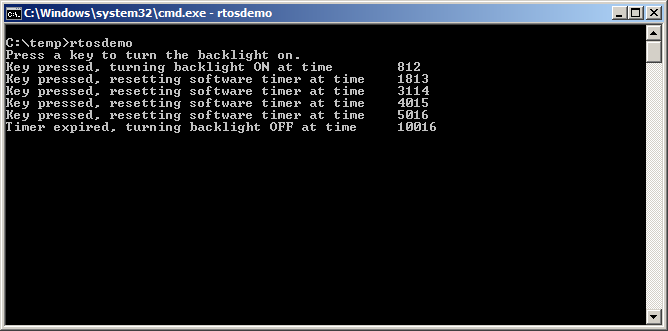
对照图 47:第一次按键发生在节拍计数 812,此时背光点亮并启动单次定时器;之后在 1813、3114、4015、5016 节拍处再次按键,都在定时器到期前完成复位;节拍计数 10016 时定时器到期,背光熄灭。
图 47 可见定时器周期为 5000 节拍:最后一次按键后恰好 5000 节拍(即最后一次复位后 5000 节拍)背光熄灭。